A team can take excellent notes and still lose the decision.
The meeting summary exists. The transcript is searchable. The project brief looks polished. Yet two weeks later, nobody knows which option was approved, who owns the follow-up, or which page is authoritative.
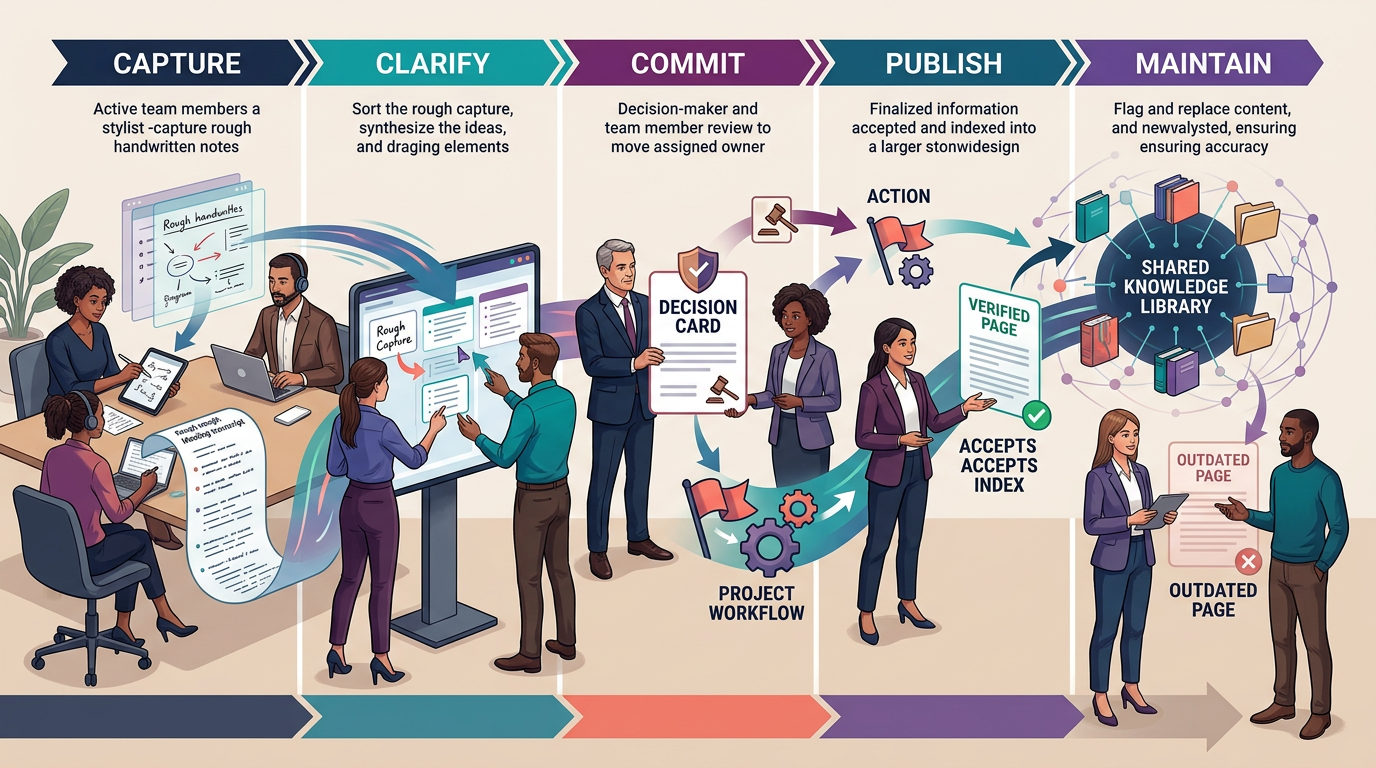
That is why the best note-taking app for a team is not simply the fastest place to type. It is the tool that can move information through a five-stage Note-to-Knowledge Relay: capture, clarify, commit, publish, and maintain.
The short assignment
- Choose Fellow when meeting discipline, agendas, action items, AI notes, and organization-level controls are the main need.
- Choose Fireflies when searchable transcripts, automated summaries, conversation intelligence, and workflow integrations matter most.
- Choose Notion when notes must graduate into connected project documentation, databases, and a verified team wiki.
- Choose Slite when the team wants a focused knowledge base with owners, review cycles, cited answers, and maintenance workflows.
- Choose Coda when notes need to become interactive team hubs, structured tables, lightweight applications, and automated workflows.
- Choose Microsoft Loop when collaborative notes and live components should remain synchronized across Microsoft 365 work.
- Choose Google Docs when broad familiarity, fast collaboration, comments, version history, offline access, and external sharing matter more than a specialized knowledge system.
Many teams need two layers: a meeting-capture tool and a trusted documentation home. Do not force one product to perform both jobs if the handoff between them can be governed clearly.
The Note-to-Knowledge Relay
Use one real meeting or project handoff to test every candidate. The note should survive five stages without losing meaning, ownership, or trust.
Stage 1: Capture
Record the discussion with the least reasonable friction. Test live typing, collaborative editing, calendar context, transcription, mobile capture, and offline behavior as appropriate. Capture should preserve useful context without collecting more sensitive material than the team needs.
Stage 2: Clarify
Convert raw notes into a concise summary. Separate facts, proposals, unresolved questions, risks, and assumptions. If AI produces the summary, compare important claims with the transcript or source material before treating them as accurate.
Stage 3: Commit
Extract decisions and actions from the chronology. Each decision needs a clear statement, date, rationale, consequences, and owner. Each action needs one accountable person and a destination where work will be tracked.
Stage 4: Publish
Move durable knowledge into the team’s approved source of truth. Apply the correct permissions, link related projects, and make the result findable without forcing colleagues to search every meeting record.
Stage 5: Maintain
Assign an owner and review trigger. Update, replace, merge, or archive the page when the decision or process changes. A perfectly organized note becomes harmful when people continue following it after it is obsolete.
Download the Note-to-Knowledge Relay Workbook
Use the workbook to define the note-taking job, run the five-stage relay across shortlisted apps, test decision retrieval, review permissions and retention, estimate operating cost, and document the final choice.
- Workflow Definition
- Five-Stage Relay
- Decision Retrieval Test
- Security and Retention Review
- Weighted Scorecard
- Cost and Ownership
- Decision Record
Fellow: the meeting-discipline layer
Fellow is the strongest starting point when recurring meetings need agendas, AI notes, action tracking, and administrative governance. It is designed around the meeting lifecycle rather than general-purpose document storage.
That focus is useful for organizations trying to standardize how meetings are prepared, captured, and followed up. Current enterprise controls include separate retention periods for recordings, transcripts, and AI Notes, including zero-day retention for recordings or transcripts when the organization wants to keep only the processed note.
- Best fit: meeting-heavy organizations that want consistent agendas, follow-up, AI-assisted notes, and centralized controls.
- Watch for: consent and recording rules, retention configuration, whether action items reach the real task system, and whether durable decisions leave the meeting archive.
- Relay test: run a recurring meeting, verify important statements, assign actions, publish one decision outside the chronology, and confirm retention behaves as configured.
Review the current Fellow product information and retention controls before rollout.
Fireflies: the searchable conversation layer
Fireflies is a strong starting point when the team needs to record, transcribe, summarize, search, and analyze conversations across meeting platforms and other audio sources. It can generate summaries, identify action items, support custom note formats, and connect conversation output to CRMs and project tools.
The advantage is breadth of capture and retrieval. The risk is confusing a searchable meeting archive with approved organizational knowledge. Transcripts preserve what was said; they do not establish what the organization ultimately decided.
- Best fit: sales, recruiting, research, customer, and operational teams that need searchable conversation records and structured summaries.
- Watch for: recording consent, transcript accuracy, speaker attribution, retention, sensitive conversations, summary-template governance, and downstream duplicate tasks.
- Relay test: locate a specific statement by speaker and time, verify the summary, extract the final decision, and publish only the approved result.
Check the current Fireflies AI Notetaker overview and summary controls before deployment.
Notion: the connected documentation workspace
Notion makes the strongest case when notes need to connect with projects, databases, reference pages, and a maintained team wiki. Meeting notes can remain linked to the relevant initiative while durable decisions and procedures move into separate authoritative pages.
Notion wikis support page owners and verification. Verification can expire and notify the owner, while verified pages receive a visible indicator in mentions and search. Those capabilities make Notion useful when the team is willing to govern the workspace rather than treat it as an unlimited canvas.
- Best fit: teams that want notes, projects, databases, and maintained knowledge in one configurable workspace.
- Watch for: page sprawl, duplicate truth, permissions, database complexity, and the need for active workspace ownership.
- Relay test: capture a meeting, extract a decision, connect it to a project, assign a page owner, set verification, and retrieve the approved page through search.
If Notion is already the chosen documentation home, use our guide on how to set up a team wiki in Notion to build the ownership and maintenance layer.
Slite: the focused knowledge-maintenance system
Slite is positioned less as a blank note canvas and more as a knowledge base that stays current. Its current product emphasizes document owners, verification cycles, scheduled reviews, cited answers, connected sources, and proposed updates that require human approval.
That focus is useful for teams whose main problem is not capturing more information but maintaining a trustworthy source of truth.
- Best fit: remote and distributed teams that want a focused company knowledge base with lower structural overhead than a highly configurable workspace.
- Watch for: connector scope, AI-answer quality, ownership discipline, migration needs, and whether meeting capture requires a separate tool.
- Relay test: publish a decision, assign an owner and review cycle, ask a natural-language question, inspect citations, and process a proposed update.
Review the official Slite knowledge-base overview for current maintenance and search capabilities.
Coda: the document that becomes a workflow
Coda combines documents, structured tables, integrations, automations, and interactive controls. That makes it useful when a meeting note or project brief needs to become a living team hub rather than remain a static page.
A product team can connect notes to roadmaps, decisions, risks, votes, status views, and actions inside one doc. The trade-off is design responsibility. A powerful doc can become a custom application that only its builder understands.
- Best fit: product, operations, and cross-functional teams that want notes connected to structured data and interactive workflows.
- Watch for: maker dependency, disconnected copies, permissions, Pack connections, automation ownership, and migration complexity.
- Relay test: turn a meeting note into a decision table, project update, and assigned action while ensuring another operator can understand the doc.
Review the current Coda product overview before designing a pilot.
Microsoft Loop: the portable collaboration layer
Microsoft Loop is a strong choice when notes, lists, tables, and tasks need to remain synchronized across Microsoft 365 work. Loop components are portable units that stay current when shared through supported applications, including Teams, Outlook, OneNote, and Whiteboard.
Loop pages and workspaces can bring together people, links, tasks, and components for collaborative planning. The important limitation is external sharing: current Microsoft support states that Loop does not support sharing with guests or external users.
- Best fit: Microsoft 365 teams that want reusable, synchronized collaborative notes in the flow of work.
- Watch for: external-collaboration limits, information lifecycle, workspace ownership, where the authoritative record lives, and tenant controls.
- Relay test: create a shared component in one application, update it elsewhere, publish the final decision in the approved home, and test access with a representative user.
Use the official Microsoft Loop support guide to verify current sharing and application support.
Google Docs: the familiar collaboration baseline
Google Docs remains a strong baseline because many teams and external collaborators already understand it. Real-time editing, comments, suggestions, version history, offline use, templates, and Drive sharing reduce implementation friction.
The weakness is not the editor. It is the surrounding information architecture. Shared Drives, folders, naming rules, group permissions, ownership, and an index are needed to prevent a collection of good documents from becoming another scattered repository.
- Best fit: teams that value rapid adoption, external collaboration, and familiar document editing.
- Watch for: folder sprawl, duplicate copies, unclear ownership, uncontrolled link sharing, and decisions that remain inside individual documents.
- Relay test: collaborate on a note, resolve comments, identify the final version, publish the decision in the team index, and confirm group-based access.
Consult the official Google Docs training and collaboration guide for current capabilities.
The decision-retrieval test
Most product demos test creation. Teams should test retrieval.
Thirty days after the pilot meeting, ask a person who did not attend to answer:
- What was decided?
- Why was that option selected?
- Who approved it?
- What action followed?
- Is the decision still current?
- Where is the authoritative page?
Record the time required, wrong pages opened, conflicting answers found, and whether the source clearly identified ownership and status. If the answer requires reconstructing a discussion from a transcript, the note-taking system has not completed the relay.
Privacy, recording, and retention checks
- Determine when recording or transcription requires notice or consent.
- Decide which meetings should never be recorded automatically.
- Separate retention periods for recordings, transcripts, summaries, and approved knowledge where the product allows it.
- Review which applications, connectors, agents, or integrations can read notes and transcripts.
- Restrict external sharing and public links.
- Test offboarding, ownership transfer, deletion, export, and legal-hold requirements.
- Do not assume an AI summary is accurate because it is concise.
- Do not place sensitive personal, health, financial, legal, customer, or employee information into an unapproved tool.
Common buying mistakes
- Buying capture without publishing: The team accumulates transcripts but never creates durable decisions.
- Buying a wiki to solve meeting discipline: A knowledge base cannot force a meeting to end with owners and actions.
- Buying AI without review rules: Summaries become authoritative even when they omit context or assign the wrong owner.
- Letting every team choose a separate home: Cross-functional retrieval becomes a search across disconnected products.
- Ignoring external sharing: A tool works internally but blocks clients, contractors, or partners.
- Confusing customization with fit: The team spends more time designing the workspace than using the notes.
- Skipping exit testing: The organization discovers too late that comments, links, permissions, databases, or recordings do not export cleanly.
Final recommendation
Choose Fellow or Fireflies when the first failure occurs inside meetings. Choose Notion or Slite when the failure is trusted knowledge. Choose Coda when notes must become an interactive operating layer. Choose Microsoft Loop when synchronized components belong inside Microsoft 365. Choose Google Docs when familiar collaboration and external access outweigh the need for a specialized system.
Then run the Note-to-Knowledge Relay. The winner is not the app that captures the most. It is the system that helps another person find the correct decision after the meeting has been forgotten.
How this guide was prepared
This editorial guide was prepared from current vendor documentation and an information-lifecycle method focused on capture, clarification, decisions, publishing, retrieval, ownership, security, retention, and maintenance. It does not claim a controlled head-to-head product test. Features, plans, integrations, AI behavior, and sharing controls change, so verify critical requirements and test the same workflow before purchasing.
