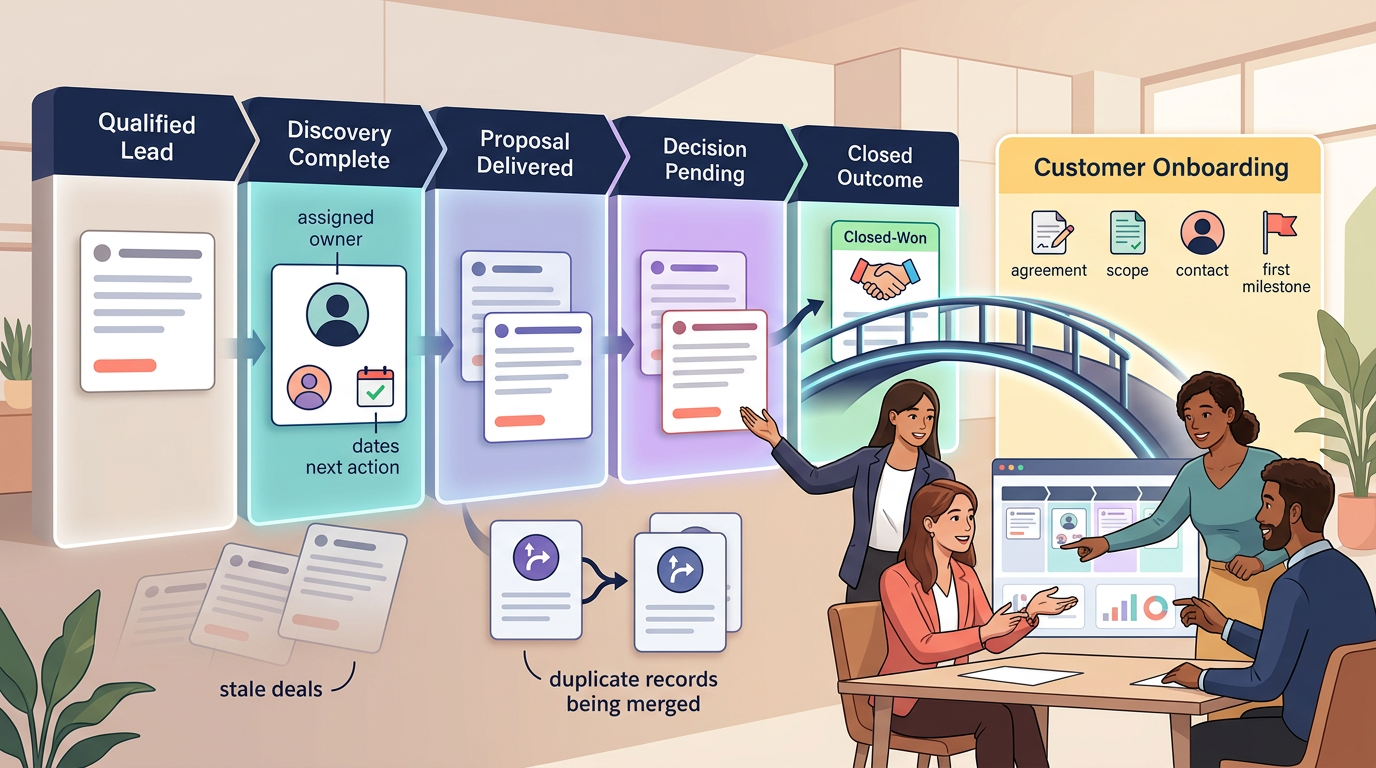
A small-team CRM should answer one question before the next customer conversation begins: What must happen next, and who owns it?
If the answer requires opening six fields, reading a long activity log, or asking in chat, the CRM is already too complicated. A useful setup keeps every active opportunity under a Next-Action Contract: one owner, one buyer-verified stage, one dated next action, and one clear path out of the active pipeline.
This guide shows how to build that system without turning CRM administration into a second job. It applies whether the team chooses HubSpot, Pipedrive, Bigin by Zoho CRM, or another small-business platform.
The six rules of a clean small-team CRM
- A contact is not a deal. Create an opportunity only when a real commercial conversation is active.
- Every active deal has one owner. Shared responsibility usually becomes no responsibility.
- Every active deal has a dated next action. “Follow up later” is not an operational plan.
- Stages reflect buyer evidence. A stage changes because the buyer did something meaningful, not because the seller drafted an email.
- Stale deals leave the active view. Nurture, close, or disqualify them according to a written rule.
- Closed Won begins the handoff. The deal is not operationally complete until delivery receives the required context.
Before configuration: define the Next-Action Contract
Write these rules before opening CRM settings. The software should enforce the process, not invent it.
Who enters the active pipeline?
A newsletter subscriber, downloaded business card, or cold list entry may belong in Contacts or a lead inbox. An active deal should represent a specific potential transaction with a plausible buyer, need, value, and next step.
This distinction is supported by CRM data models. Pipedrive, for example, separates unqualified leads from deals that move through an active pipeline. Converting a lead transfers the linked person or organization, notes, comments, and activities into the deal.
What evidence moves a deal?
Name each stage after an observable buyer commitment. “Proposal sent” is stronger than “Working.” “Decision meeting scheduled” is stronger than “Negotiation.” A stage should make the next expected event obvious.
What makes a next action valid?
- One accountable owner
- A specific action, not “check in”
- A due date
- A linked contact or deal
- A reason the action matters
- An outcome that will update the record
When does a deal become stale?
Set the threshold by stage. A new inquiry may require review after three business days. A proposal with a documented buyer timeline may remain valid longer. The rule should trigger a decision: advance, schedule a meaningful follow-up, move to nurture, or close lost.
What must cross the post-sale bridge?
Define the minimum handoff before anyone can mark a deal Closed Won. Typical items include the agreement, scope, pricing, promised exceptions, stakeholders, onboarding contact, start date, billing instructions, risks, and first delivery milestone.
Download the CRM Next-Action Control Workbook
Use the workbook to define pipeline evidence, design essential fields, test active deals for ownership and next actions, audit stale records, document the Closed Won handoff, and complete a two-week simplification review.
- CRM Charter
- Pipeline Design
- Field Budget
- Next-Action Audit
- Stale-Deal Review
- Closed-Won Handoff
- Two-Week Review
Step 1: Build the smallest useful data model
Start with three record types:
- Contacts: people and communication context
- Companies or accounts: organizations associated with contacts
- Deals or opportunities: qualified commercial transactions moving toward an outcome
A small team does not need to recreate the entire business in custom objects. Add another record type only when it represents a durable concept with its own owner, lifecycle, and reporting need.
Step 2: Use a five-stage evidence pipeline
A practical baseline is:
- Qualified: Fit, need, contact, and plausible transaction confirmed
- Discovery Complete: Requirements, decision process, stakeholders, and timing understood
- Proposal Delivered: Buyer received a specific scope and commercial offer
- Decision Pending: Buyer confirms evaluation or approval is underway with a known next event
- Closed Won or Closed Lost: Outcome recorded with reason and handoff or learning
Keep broad lead capture outside this pipeline. Pipedrive’s Leads Inbox follows this principle by maintaining prequalified leads separately until they are ready to become deals. Pipedrive also advises using fewer, action-oriented stages that mirror the real sales process.
Do not use internal production tasks as stages. “Write proposal,” “Ask manager,” and “Update pricing” belong in activities or tasks. They do not describe buyer progress.
Step 3: Establish a field budget
Every field charges a small tax: someone must understand it, populate it, maintain it, migrate it, and decide whether it is trustworthy. Start with standard fields and no more than five new required fields unless the sales process clearly demands more.
- Required at qualification: owner, primary contact, company, source, need, and next action
- Required for forecasting: amount, expected close date, stage, and buyer-confirmed next event
- Required at Closed Lost: standardized lost reason and concise context
- Required at Closed Won: agreement, scope summary, onboarding contact, start timing, and delivery risks
Use dropdowns for values that must support filtering and reporting. Use free text for context that cannot be represented honestly with a controlled list. Delete any field nobody uses to make a decision.
Step 4: Make the next action visible
Every active opportunity should show its next action without opening a long note. Examples include:
- Send revised scope to the operations lead by Thursday
- Confirm procurement requirements with the buyer on November 14
- Prepare pricing options before the decision meeting
- Close lost if no response after the final agreed follow-up
Do not force the CRM to create endless low-value reminders. One meaningful next action is better than a queue of overdue “check in” tasks.
Step 5: Configure guardrails, then stop
Use only the controls required to protect the process:
- Require key properties before a meaningful stage change when the selected plan supports it.
- Prevent or flag stage skipping only when the sequence truly matters.
- Assign new leads through one documented rule.
- Highlight deals with no recent activity.
- Notify the owner when a deal lacks a next action.
- Create the post-sale handoff after Closed Won.
Plan availability matters. HubSpot supports pipelines broadly, but custom pipelines, conditional stage logic, pipeline restrictions, and approval controls vary by subscription. Pipedrive limits pipeline editing to users with the appropriate deal-administration permissions. Verify the exact plan before turning process rules into configuration requirements.
Step 6: Import fewer records than expected
Importing a contact list is not the same as creating a clean CRM. Before migration:
- Normalize company domains and email addresses.
- Remove obvious duplicates.
- Separate active opportunities from general contacts.
- Assign owners.
- Map only approved fields.
- Preserve the original source file outside the CRM.
- Import a small sample and inspect associations before loading the remainder.
Bigin by Zoho CRM, for example, supports individual contact creation, imports, website forms, filtered views, and contact timelines. Those features help centralize records, but the team still owns entry criteria and cleanup.
Step 7: Test the Closed Won bridge
Create one synthetic deal and move it through the complete lifecycle. At Closed Won, verify that delivery receives:
- Customer and stakeholder details
- Signed agreement or approved order
- Scope, exclusions, and promised exceptions
- Price and billing terms
- Onboarding contact
- Start date and first milestone
- Risks, dependencies, and unresolved questions
- Links to relevant notes and files
Keep sales and delivery records connected but distinct. Bigin’s Team Pipelines illustrate one way a small business can separate customer-facing processes such as sales, service, refunds, and onboarding while retaining them in the same system.
The two-week subtraction review
Run the CRM for two weeks before adding more configuration. Then hold a 30-minute subtraction review.
- Which fields were repeatedly left blank?
- Which values were entered inconsistently?
- Which stage caused arguments?
- Which records lacked owners?
- Which active deals lacked a dated next action?
- Which automation created noise?
- Which report changed a decision?
- Which records should not have entered the pipeline?
Remove unused fields, merge ambiguous stages, disable noisy alerts, and retrain the entry rule. A simple CRM becomes useful through subtraction.
Three CRM setups that stay small
Solo founder
Use one pipeline, one owner, four or five stages, and one rule: every active deal has a dated next action within five business days. Keep unqualified contacts outside the pipeline. Avoid sequences, lead scoring, and elaborate dashboards until missed follow-ups become a pattern.
Three-person sales team
Use one assignment rule, standardized lost reasons, required amount and close date before proposal, and a weekly review of ownerless or stale opportunities. Keep the pipeline based on buyer evidence so forecasting means the same thing to every rep.
Service business with account handoffs
Keep active sales separate from customer delivery. Require the Closed Won handoff fields and create an onboarding record or task in the delivery system. Track renewals as dated activities or a dedicated renewal process rather than leaving every past client in the active sales pipeline.
Security, privacy, and data-quality checks
- Use role-based access and least-privilege integrations.
- Decide which users can export, delete, merge, or bulk-edit records.
- Do not store passwords, payment-card data, medical details, government identifiers, or unnecessary sensitive notes in general CRM fields.
- Document the lawful and appropriate basis for collecting, using, and retaining contact data in applicable jurisdictions.
- Configure offboarding and record reassignment before the first employee departure.
- Review public forms for excessive data collection and spam risk.
- Test deletion, correction, export, and retention procedures.
- Separate facts from subjective or inappropriate personal commentary.
When a spreadsheet is still enough
A shared spreadsheet can be sufficient when one or two people manage fewer than roughly 10 active opportunities, follow-up is not being missed, access needs are simple, and there is no requirement for communication history, automation, or complex permissions.
Move to a CRM when ownership becomes unclear, opportunities fall through, duplicate records multiply, reporting requires manual reconstruction, or customer context is trapped in individual inboxes.
Choosing the software
After the process is defined, compare tools by the actual sales motion, team size, integration needs, administration capacity, and three-year operating cost. Our Best CRM Tools for Small Business guide is the natural next step.
Final recommendation
Start with one pipeline, five stages, a small field budget, one owner per record, and a dated next action for every active deal. Build the post-sale bridge before adding advanced automation.
The best CRM setup is not the most complete. It is the one the team can keep accurate while still spending most of the day serving customers and moving real opportunities forward.
How this guide was prepared
This guide was prepared from current CRM vendor documentation and a small-team operating method focused on qualification, buyer-evidence stages, next-action ownership, stale-deal control, data quality, handoffs, permissions, and maintenance. It does not claim a controlled implementation study. Product features and plan availability change, so verify critical requirements in the selected CRM before relying on them.