The most expensive AI assistant is not necessarily the one with the highest subscription price. It is the one that produces a polished answer, then leaves you to rebuild the work inside your email, documents, spreadsheets, project system, or research notes.
That is why “Which AI assistant is best?” is the wrong first question. A better question is: Where does the work begin, what must the assistant handle, and where does the finished work need to land?
For many teams, the shortlist includes ChatGPT, Claude, Gemini, Microsoft Copilot, and Perplexity. Each can draft, summarize, analyze, and research. The important differences appear when the assistant has to work with company context, produce an editable deliverable, cite sources, respect administrative controls, or hand work to the next system.
The quick assignment
- Choose ChatGPT when you need a flexible generalist for writing, analysis, coding, file work, and multistep problem solving across varied tasks.
- Choose Claude when long documents, careful drafting, sustained reasoning, project context, or coding workflows dominate the job.
- Choose Gemini when work already lives in Gmail, Drive, Docs, Sheets, Slides, Meet, Chat, and Calendar.
- Choose Microsoft Copilot when the useful context is inside Microsoft 365 and the expected output is an editable Word document, Excel workbook, PowerPoint presentation, Outlook message, or Teams-based work product.
- Choose Perplexity when source-backed external research is the center of the task and citations need to remain visible throughout the answer.
That assignment is deliberately conditional. Product capabilities, plans, connectors, and usage limits change quickly. The final choice should come from a controlled test using your own work, security requirements, and approved data.
The workday relay: five handoffs an assistant must survive
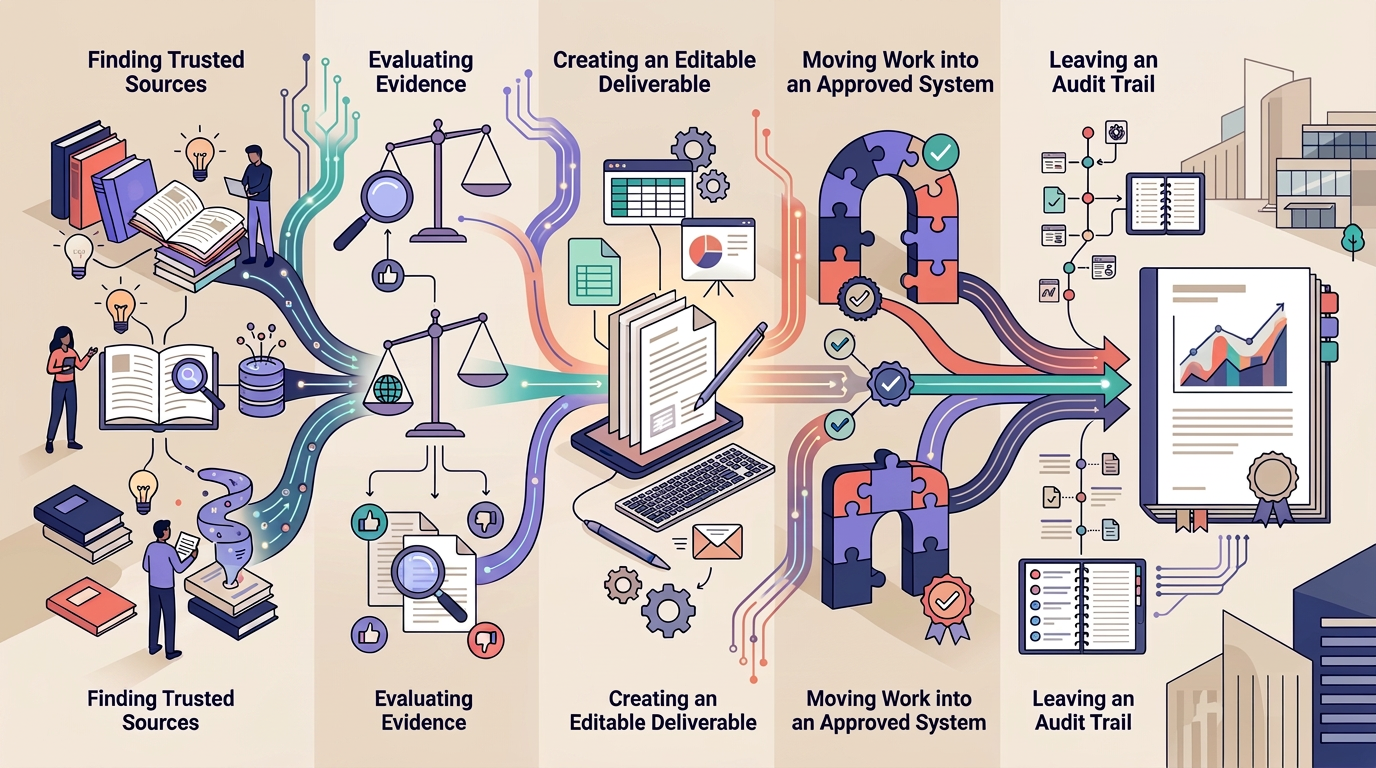
An AI assistant becomes valuable when it can carry work through a sequence without losing the facts, format, ownership, or next action. Test the following relay rather than asking each product an isolated trivia question.
Handoff 1: Find the source of truth
Give the assistant a question that requires both current external information and one approved internal source. Record whether the assistant distinguishes public evidence from company material, provides traceable citations, and tells you when evidence is missing.
Handoff 2: Turn evidence into judgment
Ask for a recommendation with explicit constraints, such as budget, deadline, policy, audience, and risk tolerance. A useful assistant should show why the recommendation fits the constraints instead of hiding behind a generic list of options.
Handoff 3: Produce the real deliverable
Do not stop at a chat response. Require the actual format your team uses: an editable document, workbook, presentation, email draft, project brief, code change, or sourced research memo. Check formatting, formulas, citations, links, and whether another person can continue the work.
Handoff 4: Move the work forward
Test the next action. Can the assistant place the result in the approved workflow, prepare the email, update the task, or connect through an authorized automation? If app-to-app orchestration is central, compare the automation layer separately in our Zapier vs. Make guide. An assistant should not receive broad permissions merely to save a few clicks.
Handoff 5: Leave an audit trail
Review what remains after the task is complete. Can a colleague identify the sources, assumptions, edits, approvals, and unresolved uncertainties? For consequential work, a confident paragraph without provenance is not a finished deliverable.
Download the AI Assistant Workday Relay Workbook
Use the companion workbook to define one recurring job, run the same five-handoff test across ChatGPT, Claude, Gemini, Microsoft Copilot, and Perplexity, review security requirements, estimate first-year operating cost, and document the final decision.
- Job Definition
- Five-Handoff Workday Relay
- Weighted Scorecard
- Security and Governance Review
- Cost and Adoption Model
- Decision Record
Excel workbook (.xlsx). Use approved, non-sensitive pilot data. Product capabilities, plans, and controls can change, so verify current vendor documentation before purchasing.
ChatGPT: the flexible generalist
ChatGPT has the strongest case when the work changes shape throughout the day. A user might begin with research, upload files, analyze data, draft a brief, revise code, and build an artifact without treating each step as a separate product search.
OpenAI continues to expand business workspaces, administrative settings, work-oriented experiences, coding capabilities, and connections to other tools. That breadth makes ChatGPT a practical default for mixed individual workflows and small teams that do not live entirely inside one productivity suite.
- Best fit: varied knowledge work, content development, analysis, coding, file transformation, and tasks that shift between formats.
- Watch for: plan-specific limits, connector permissions, workspace configuration, and the temptation to treat a fluent answer as verified evidence.
- Pilot task: turn a research packet and spreadsheet into a sourced recommendation, editable deliverable, and concise executive summary.
Review the current ChatGPT Business release notes before purchasing because models, tools, and included usage can change frequently.
Claude: the deep-work specialist
Claude is compelling when the task depends on maintaining coherence across long material. That can include reviewing policies, working through research, restructuring a difficult draft, analyzing a codebase, or keeping a multi-step project grounded in a large body of context.
Anthropic’s Team offering includes Projects and knowledge features, workplace connectors, centralized administration, and a 200,000-token context window. Claude Code is also included with Team seats, which broadens the product beyond writing into technical and automation work.
- Best fit: long documents, careful drafting, policy analysis, complex revision, sustained reasoning, and code-oriented workflows.
- Watch for: usage limits, connector scope, whether source attribution meets the task, and whether the final result must be created directly inside another productivity suite.
- Pilot task: compare several long internal documents, identify contradictions, and produce a revision brief with passages that reviewers can verify.
Check the current Claude Team plan documentation for supported locations, seat types, connectors, administrative controls, and current limits.
Gemini: the Google Workspace native
Gemini has the clearest advantage when the work already moves through Google Workspace. The useful outcome is not merely a response from a chatbot. It is the ability to work with context from Gmail, Drive, Docs, Sheets, Slides, Chat, Meet, and Calendar while keeping the result close to the files and conversations people already use.
Google continues to place Gemini directly inside Workspace applications, including document drafting, presentation creation, form-response analysis, and meeting-related workflows. That proximity can reduce copying and rebuilding, especially for organizations already standardized on Google Workspace.
- Best fit: teams whose email, files, meetings, documents, spreadsheets, and presentations are centered on Google Workspace.
- Watch for: edition-specific availability, staged rollouts, administrator controls, source quality, and whether the task depends on systems outside Google’s environment.
- Pilot task: use approved Drive material and Gmail context to prepare a briefing, update a document, and create an editable presentation without manually rebuilding the source material.
Use the official Google Workspace Updates feed to verify current rollouts before treating a feature as available to every user.
Microsoft Copilot: the Microsoft 365 operator
Microsoft Copilot makes the strongest case when the work is already distributed across Outlook, Teams, SharePoint, OneDrive, Word, Excel, and PowerPoint. Its value comes from working near Microsoft 365 content and producing editable Office deliverables, not from winning a generic chatbot contest.
Microsoft’s current direction brings chat, delegated work, code, agents, and Office creation into a broader Copilot experience. Release notes also show continuing changes inside Word, Excel, PowerPoint, OneDrive, SharePoint, Teams, and administrative reporting. Availability can vary by platform, channel, tenant settings, and rollout stage.
- Best fit: Microsoft 365 organizations that want grounded assistance across communications, meetings, files, and editable Office artifacts.
- Watch for: licensing, permissions inherited from Microsoft 365, information oversharing that already exists in the tenant, gradual feature deployment, and the difference between chat and action capabilities.
- Pilot task: prepare a meeting briefing from approved files and communications, then create an editable Word document, Excel analysis, or PowerPoint presentation with traceable sources.
Consult the current Microsoft 365 Copilot release notes to confirm platform and rollout status.
Perplexity: the research desk
Perplexity is strongest when the first deliverable is a sourced understanding of the outside world. Its research experience emphasizes visible citations, follow-up questions, and connections between external information and approved company knowledge.
Perplexity Enterprise describes support for external research, internal knowledge, connectors, complex projects, administrative controls, audit logs, and enterprise privacy protections. Its product is expanding into broader agentic work, but research provenance remains the clearest reason to place it on the shortlist.
- Best fit: market scans, competitor research, source discovery, briefing preparation, and questions where readers must inspect the evidence.
- Watch for: citation quality rather than citation presence, source freshness, retention settings, connector permissions, and whether the final artifact must be created inside another suite.
- Pilot task: research a changing market question, exclude weak sources, identify disagreement, and produce a brief whose important claims can be traced to primary evidence.
Review the current Perplexity Enterprise overview and security terms for the plan under consideration.
Do not buy one assistant for every employee on day one
A company-wide rollout can hide whether the tool is actually useful. Start with roles and recurring jobs. A five-person pilot might include a researcher, writer, analyst, project lead, and operations owner. Give all candidates the same workday relay and record completion quality, elapsed time, corrections, source failures, administrative effort, and how much manual rebuilding remains.
The organization may discover that one assistant is the standard platform while a smaller group needs a specialist. For example, Microsoft 365 users may rely on Copilot for grounded Office work while a research team uses Perplexity for external evidence. A software group may standardize on Claude or ChatGPT for technical work. The right answer can be a governed portfolio, but only when roles, data boundaries, and costs are explicit.
Privacy and security questions that belong in the pilot
Do not paste sensitive company information into a consumer account simply because the output is useful. Evaluate the exact business or enterprise plan, not the product name in isolation.
- Is customer content used to train models by default under this plan?
- Which administrators can enable connectors, agents, plugins, or actions?
- What data can each connection read, write, retain, or export?
- Are single sign-on, automated provisioning, role controls, audit logs, retention settings, and data residency available where required?
- Can users share generated work or connected content outside the organization?
- How are departed employees, revoked permissions, legal holds, and records-retention requirements handled?
- Can the organization monitor adoption, usage, costs, and risky behavior without collecting unnecessary employee data?
Security documentation is not a substitute for configuration. An assistant can respect existing permissions and still expose information too broadly if the underlying workspace is poorly governed.
The answer by work environment
If work is varied and crosses many formats: begin with ChatGPT.
If long documents, deep revision, or sustained technical work dominate: begin with Claude.
If Google Workspace is the operating environment: begin with Gemini.
If Microsoft 365 is the operating environment: begin with Microsoft Copilot.
If source-backed external research is the primary job: begin with Perplexity.
“Begin with” is intentional. The final decision belongs to the workday relay, not the brand reputation. Choose the assistant that can find the right context, exercise useful judgment, produce the actual deliverable, move the work forward safely, and leave evidence another person can review.
How this guide was prepared
This editorial guide was prepared from current vendor documentation and a workflow-fit method focused on evidence, judgment, deliverable creation, action, governance, and auditability. It does not claim a controlled head-to-head product test or long-term production use of every assistant. Features, plans, connectors, usage limits, and security controls change frequently. Confirm critical requirements in current vendor documentation and test them with approved data before purchasing.