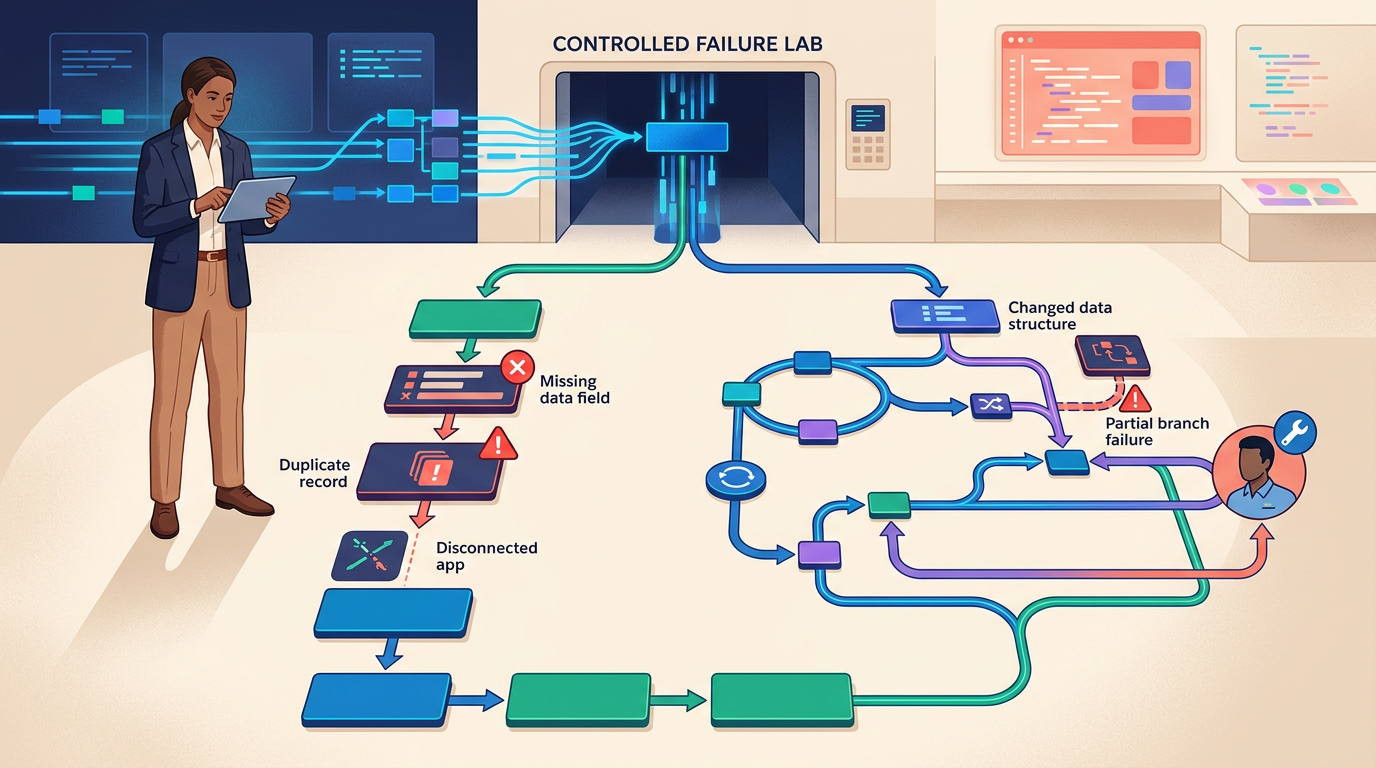
An automation is easy to admire when every app responds, every field is complete, and every record follows the expected path. The platform choice becomes visible when a required value is missing, an API times out, a duplicate arrives, or an app changes its data.
That is the useful distinction in Zapier vs. Make. Zapier usually reduces the effort required to build and operate common business automations. Make usually gives the builder more control over how data branches, transforms, repeats, and recovers.
Neither is automatically easier or cheaper once the workflow is running at volume. The better choice depends on the workflow’s failure surface: how many steps can break, how difficult those failures are to diagnose, and who will own recovery after the original builder moves on.
The short verdict
- Choose Zapier when the workflow is mostly linear, the app stack is broad, fast deployment matters, and nontechnical operators need to understand routine maintenance.
- Choose Make when the workflow needs visual branching, repeated processing, aggregation, detailed data transformation, or more deliberate error-handling routes.
- Choose neither yet when the process is unstable, the data has no clear owner, or the team has not defined what should happen after partial failure.
The final decision should come from testing the same workflow under failure, not from comparing a two-step demo.
The Automation Failure Lab
Build one representative automation in both platforms. Then introduce six controlled faults. The goal is not to make either platform fail. It is to measure how clearly each platform fails and how safely the team can recover.
Fault 1: A required field is empty
Remove a value the destination system expects, such as an email address, account ID, or phone number. Determine whether the workflow stops, follows an alternate path, substitutes a safe value, or quietly creates a damaged record.
Fault 2: The same event arrives twice
Send the source event twice. Check whether the automation creates duplicate customers, tasks, invoices, or notifications. A reliable workflow needs an idempotency rule, unique key, lookup, or deduplication step.
Fault 3: An app is temporarily unavailable
Simulate a timeout, rate limit, expired connection, or unavailable destination. Record retries, backoff, incomplete runs, alerts, and whether the workflow can resume without repeating successful earlier actions.
Fault 4: The data shape changes
Change a field name, send a list instead of a single value, or introduce a new status. Observe whether the builder exposes the mismatch clearly and how much mapping must be repaired.
Fault 5: One branch succeeds and another fails
Let the CRM update succeed while the notification or project task fails. Decide whether the correct response is retry, rollback, compensate, escalate, or continue. Partial success is where many “working” automations create operational debt.
Fault 6: The original builder is unavailable
Give the workflow to another operator with only the documentation and platform history. Measure how long it takes to identify the trigger, understand transformations, locate credentials and owners without exposing secrets, reproduce the failure, and restore service.
Download the Automation Failure Lab Workbook
Use the workbook to define one workflow, calculate realistic run volume, test six controlled faults in Zapier and Make, compare recovery effort, assign ownership, and record the final platform decision.
- Workflow Definition
- Volume and Billing Model
- Six-Fault Test
- Recovery Scorecard
- Ownership and Runbook
- Decision Record
Zapier is built for operational legibility
Zapier’s strongest advantage is not that it lacks advanced logic. Zapier supports filters, paths, loops, webhooks, code, tables, interfaces, agents, and custom error handlers. Its advantage is that common workflows can often be represented as a readable sequence of trigger and action steps.
That matters when the people maintaining the automation are sales operations, marketing, recruiting, customer success, or general business teams rather than dedicated integration engineers.
- Best fit: linear or moderately branching workflows, broad SaaS stacks, quick deployment, and teams that prioritize understandable maintenance.
- Strength: a large integration ecosystem and an approachable step-based builder.
- Watch for: task consumption across high-volume multi-action workflows, plan-specific capabilities, sprawling Zaps, and hidden dependency on the original builder.
Zapier filters and paths provide conditional logic, and stopped items do not continue into later actions. Zapier also supports a custom error-handler branch on eligible steps, allowing a failed action to trigger an alternate workflow. Those capabilities make the old description of Zapier as a simple two-step tool incomplete.
Review the current Zapier filter and path rules and custom error handling before designing the pilot.
Make is built for visible data movement
Make presents the automation as a visual scenario. Routers, filters, iterators, aggregators, transformations, and error-handling routes can make complex data movement easier to inspect as a system rather than a long sequence.
The same visual freedom creates more design choices. A scenario filled with crossing routes, repeated mappings, and unnamed modules can become as difficult to maintain as undocumented code.
- Best fit: workflows with multiple branches, arrays, repeated records, aggregation, custom transformation, or detailed recovery behavior.
- Strength: visual control over data flow and failure routes.
- Watch for: scenario complexity, credit consumption from repeated module execution, difficult mappings, and insufficient runbook documentation.
Make’s error-handling system can route failures through predefined responses, while incomplete executions can create a queue for manual intervention. The platform also documents retry and backoff behavior. That gives experienced builders granular control, but the team must decide which failures should resume, ignore, retry, commit, roll back, or escalate.
Use the official Make error-handling documentation when designing the recovery test.
Do not compare tasks with credits as if they were identical
Zapier and Make meter work differently. A sticker-price comparison can therefore be misleading.
For Zapier, estimate how many billable action steps run each time the workflow succeeds, then multiply by monthly runs. For Make, estimate how many modules execute, including iterations, routers, repeated bundles, error routes, and operations that may consume more than one credit under the current rules.
Use three scenarios rather than one average:
- Normal month: expected volume with typical branch distribution
- Peak month: campaign, seasonal, or growth-driven volume
- Failure month: retries, duplicate events, looping mistakes, and recovery routes
Then add labor. A platform that saves subscription cost but requires five more hours of monthly troubleshooting may have the higher total operating cost.
Five workflow patterns and the better starting point
A lead form creates a CRM record and sends a notification
Start with Zapier. The process is mostly linear, the apps are common, and legibility matters more than advanced data manipulation. Add a lookup or unique key before creating the CRM record to prevent duplicates.
An order contains a variable list of line items
Start with Make. Iteration, aggregation, and branch-level transformations are central to the workflow. Test how each line item affects credit use and what happens when only one line fails.
A small team needs ten simple automations
Start with Zapier. A consistent step-based pattern may make ownership easier across marketing, operations, and client-service workflows. The team should still maintain a workflow inventory and owner for every production Zap.
A data pipeline must branch, enrich, aggregate, and reconcile
Start with Make. The visual scenario can expose how bundles move through branches and transformations. Require naming conventions, annotations, and an error route before launch.
AI output triggers business actions
Test both. AI introduces uncertain output, variable cost, and additional failure modes. Validate schema, confidence, prohibited content, and human-approval requirements before the automation writes to customer, financial, HR, publishing, or production systems.
If the team still needs to choose the assistant, our Best AI Assistants for Work guide compares assistants by evidence, deliverables, action, and auditability.
The minimum production runbook
Regardless of platform, every production workflow should document:
- Business purpose and accountable owner
- Trigger, source system, and destination systems
- Expected monthly and peak volume
- Fields that contain personal, confidential, or regulated data
- Credential owner and rotation process, without recording secrets in the runbook
- Unique key or duplicate-prevention rule
- Branch conditions and transformation rules
- Expected failure modes
- Retry, rollback, compensation, and escalation behavior
- Alert recipient and response time
- Manual recovery procedure
- Test record and last successful review
- Shutdown procedure
If another operator cannot restore the automation from this information, the workflow is not operationally owned.
Security and governance checks
- Use least-privilege app connections rather than personal administrator accounts.
- Separate development and production workflows when the connected systems allow it.
- Do not place secrets, tokens, or passwords in plain-text fields, notes, or workbook cells.
- Review logs and stored payloads for personal or confidential information.
- Restrict who can publish, change, transfer, or delete production workflows.
- Revoke connections when an owner leaves or a tool is retired.
- Require human approval before uncertain AI output triggers consequential actions.
- Maintain a workflow inventory with owners, systems, risk class, and review timing.
Common buying mistakes
- Choosing from a perfect demo: The happy path reveals little about recovery.
- Calling Zapier simple and Make advanced: Both support meaningful logic; the difference is how complexity is represented and operated.
- Comparing monthly prices without counting work: Task and credit models require workflow-specific volume calculations.
- Ignoring partial success: A workflow may update one system and fail in the next, leaving inconsistent records.
- Automating an unstable process: Software accelerates ambiguity when rules and ownership are unclear.
- Skipping documentation: The automation becomes dependent on the builder’s memory.
- Letting AI output bypass validation: Fluent output is not a safe trigger for consequential writes.
Final recommendation
Choose Zapier when operational clarity, speed, and broad app coverage matter more than fine-grained control. Choose Make when the workflow genuinely requires richer visual data handling, branching, iteration, aggregation, or recovery logic.
Then break the automation on purpose. The better platform is the one your team can diagnose, recover, explain, and afford after the demo stops being perfect.
How this comparison was prepared
This editorial comparison was prepared from current vendor documentation and an automation-reliability method focused on data quality, duplicates, outages, schema changes, partial success, recovery, ownership, security, and operating cost. It does not claim a controlled head-to-head implementation study. Features, billing rules, limits, and plan availability change, so verify the current terms and test the same production-like workflow before purchasing.